- Blog
11 Business-Driven Reasons Why We Love Fabric
From architecture to operating models, a practical look at what truly sets Microsoft Fabric apart. And why it enables faster, more cost-effective enterprise analytics at scale.

From architecture to operating models, a practical look at what truly sets Microsoft Fabric apart. And why it enables faster, more cost-effective enterprise analytics at scale.

Three smart, efficient approaches you can take to make Power BI a reality in your company.

Expand the basic functionality to incorporate comparison dates.

When to use them, difference from dataset and dataflows and basic admin.

Ensure your data is as Tableau friendly as possible.

The case for using off-the-shelf ETL tools.

5 situations when home-grown ETL makes sense.

Power BI composite models is a game changer.
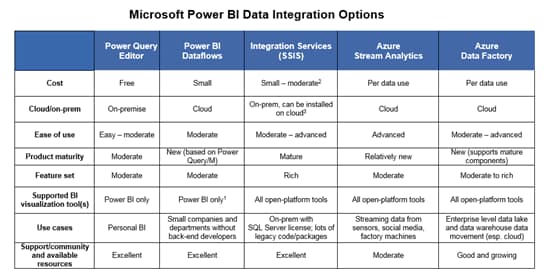
Compare 5 Microsoft options.

Synopsis of Microsoft’s two popular cloud-based options.

A matrix that makes it easy to match up report and dashboard distribution to license.

Read more to avoid these Power BI Premium deployment mistakes.

Strengths and weakness of data modules and when it’s better to use Framework Manager.

Dataflows and datasets are ways to organize and model self-service data.

Power BI offers many ways to pull in data for analysis. But what approach should your organization take? The answer depends on considerations that include whether or not your organization has an existing data warehouse, your need for real-time dashboarding and the ease-of-use factor for your analysts. We explore four options, outlining the pros and cons of each.

We tell you about the features, pricing and admin functionality.
